Final Portfolio
As we reach the end of EDCI 337, this Final Portfolio serves as an opportunity to step back and look at the progress made, the artifacts created, and the principles that have shifted my perspective on digital media. Over the past few months, my focus has moved away from simply consuming digital content toward critically examining how that content is structured, designed, and presented to facilitate authentic learning.
Below is a breakdown of how I have met the core learning outcomes for this course, supported by artifacts from my blog and reflections on the challenges I faced and overcame along the way, as well as talking about my future with what I have learned in this course specifically on AI and how the guest lectures have shaped some of what I will take into the industry.
Contextualize how learning informs interactive and multimedia experiences
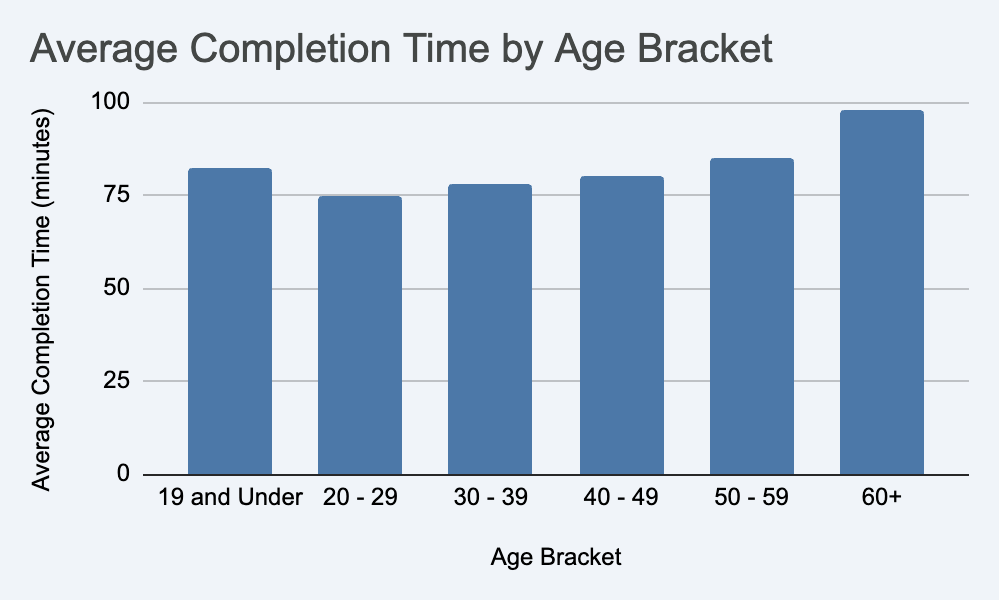
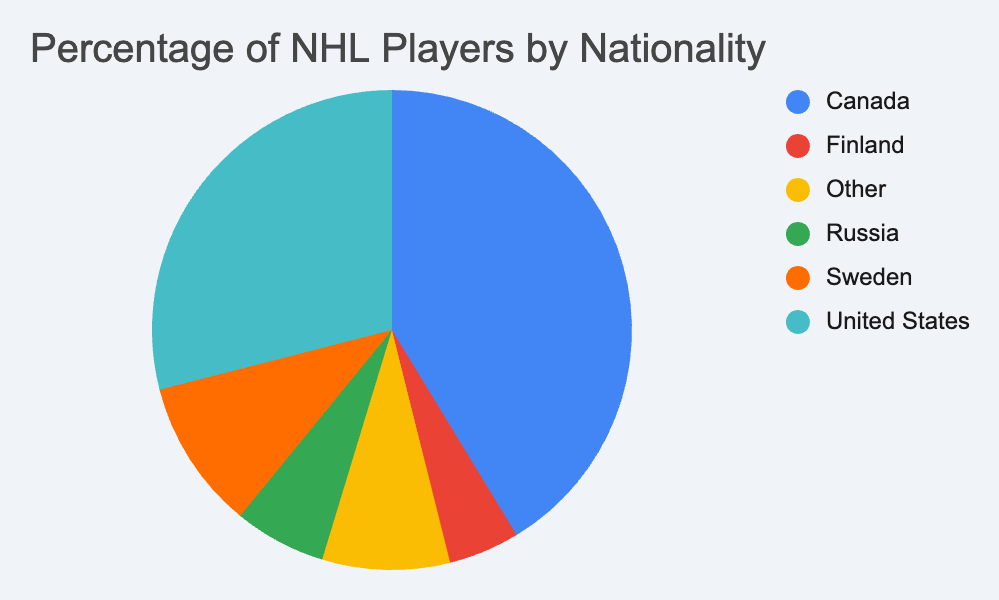
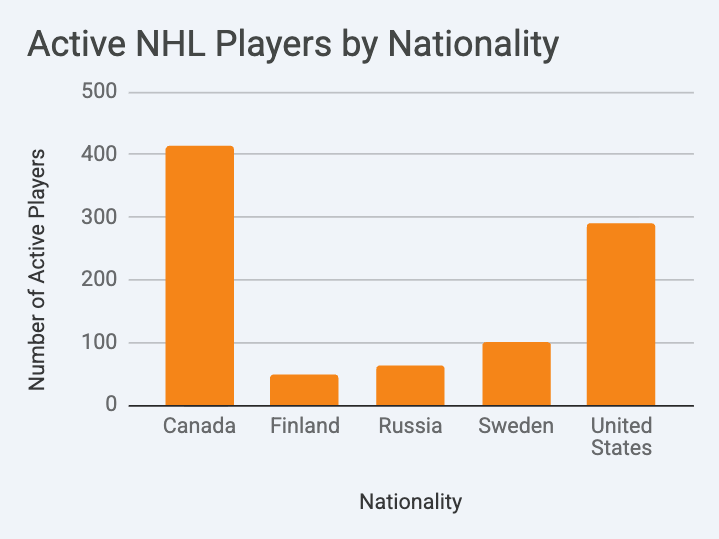
Creating these visualizations forced me to recognize that learning is entirely dependent on how information is contextualized for the user. A massive spreadsheet of NHL player data or thousands of logged Grouse Grind times are useless to the casual reader. Contextualizing learning means recognizing the limitations of working memory. By intentionally selecting specific, relatable subsets of data like highlighting specific age groups on a local hiking trail, the interactive experience becomes a targeted narrative rather than an overwhelming data dump. It shifts the focus from simply presenting information to actively facilitating understanding.
When designing these visualizations, I directly applied several of Richard Mayer’s Theories of Multimedia Learning to ensure they were effective and accessible educational resources:
- Coherence Principle: I intentionally stripped away background data and have strictly the visuals. There are no unnecessary background colours, grid lines, or 3D effects in the tables. Excluding this extraneous material ensures the audience’s cognitive capacity is spent interpreting the data, not deciphering the design.
- Spatial Contiguity Principle: Rather than having a separate legend that forces the user to look back and forth between a colour key and the data point, I placed the text labels, the numerical data, and the visual indicators directly next to each other within the same row. This spatial proximity drastically reduces the cognitive load required to understand the relationships within the data.
Apply multimedia design principles in planning your educational resources
A significant portion of my learning was dedicated to understanding and applying Richard Mayer’s Principles of Multimedia Learning. I focused on this extensively while planning and executing my final project, which can be seen in its early stages in my Multimedia Story Draft.
- Segmenting Principle: I planned the narrative of my Quarry Rock hike around seven distinct wooden bridges, deliberately breaking the continuous journey into user-paced segments to manage cognitive load.
- Coherence Principle: I excluded extraneous material by relying strictly on natural ambient audio rather than utilizing distracting, artificial background music.
- Modality & Spatial Contiguity: I utilized spoken narration paired with my video clips and ensured that any structural text was placed in close proximity to the relevant visual on the screen.
Engage in design thinking to create multimedia learning projects
Design thinking requires an iterative process of prototyping, testing, and refining based on feedback. During the creation of my final multimedia story on the Baden Powell Trail, I faced a significant challenge regarding the pacing and sensory output of the project. Initially, my video clips of the trail bridges played continuously.
Through peer feedback from my learning pod, I realized this created a rushed pacing that did not accurately reflect the physical effort of the hike, and the cognitive load was simply too high and would prove to be too hard to follow and unable to accurately tell the story. I fixed on my design by introducing a standalone video/audio recording of one of the flowing rivers as a “buffer” between intense video segment collages. Identifying this usability issue, testing a structural fix, and deploying a better user experience is what design thinking looks like in practice.
Apply storytelling principles in creating effective learning opportunities
Effective learning often relies on a compelling narrative structure to anchor new information. Rather than just showing the final destination of Quarry Rock, I wanted my story to emphasize the physical progression of the journey itself.
By using the seven bridges as physical and narrative waypoints, I created a chronological story arc that built anticipation and guided the audience through the changing coastal forest environment. The contrast between the enclosed, heavily wooded bridge crossings and the final open expanse of the Indian Arm viewpoint provided a clear narrative climax. This process proved that the underlying structure of a story is just as critical for engagement as the content itself.
Describe and apply principles of effective interactive multimedia design
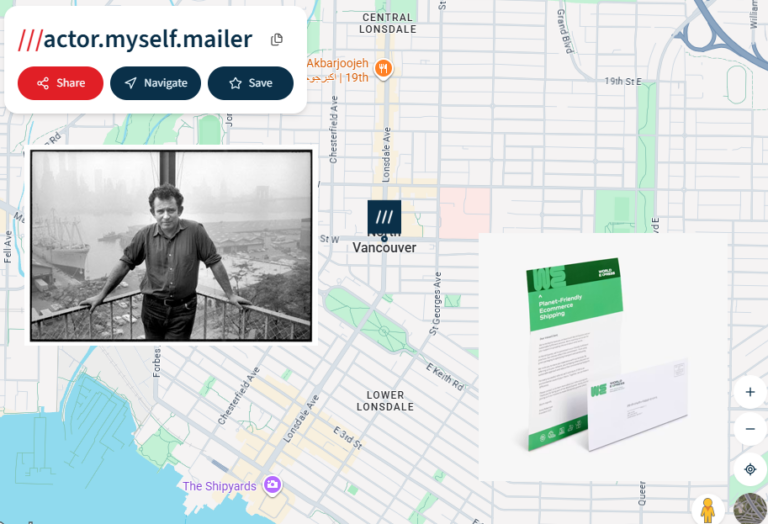
Interactive design is about creating touchpoints that invite the user to engage rather than passively consume. I explored this through my participation in the daily challenges. For example, in my Daily Creates: Text post, I experimented with blending digital navigation with physical environments, such as the “What 3 Words Map Story” detailing my walk to the post office in North Vancouver.
A major struggle I faced with interactive design was balancing creativity with clarity. Sometimes, trying to be too clever with interactive elements introduces what I like to call “technical friction.” I had to constantly reel in my ideas to ensure the core message remained accessible and intuitive for the user, rather than making them work too hard to understand the interface. I was able to apply these principles when completing my daily creates and was consciously aware of what I was creating and who a potential audience was for these artifacts.
Generate a variety of prototype artifacts including: comics, videos, and web pages
Throughout the course, I built a diverse catalog of digital artifacts. My blog itself serves as a continuous web page prototype, organizing my learning journey and housing my reflections. Beyond that, I generated multiple forms of media to practice rapid prototyping:
- Text/Image: Writing creative backstories for images, such as “Tommy the Galapagos giant tortoise” in my Daily Creates: Text post.
- Video/Audio: Capturing the physical environment of Deep Cove, carefully isolating ambient audio (like footsteps and creaking wood) in my multimedia story, alongside other experiments in my Daily Creates: Audio and Daily Creates: Image posts.
These exercises forced me out of my comfort zone and taught me how to quickly adapt and use different digital tools to portray my creative thoughts and ideas.
Use GenAI appropriately as a tool to support creative activities
I used AI as a brainstorming partner to help generate initial concepts and to efficiently track down formable websites and reputable sources when I was building the foundation of my projects. It helped me structure my thoughts and organize my approach before I ever started building.
While the tool helped me plan, the actual creation of the artifacts was entirely my own. The video footage captured at Deep Cove, the carefully isolated ambient audio recordings on the wooden bridges, the formatting of the data visualizations, and the construction of the final digital artifacts were all executed manually by me.
Moving Forward: Career, Courses, and Life
Looking ahead, the skills I have developed in EDCI 337 extend far beyond learning about daily creates and wordpress capabilities. As I step closer to entering the professional workplace in the information technology industry, understanding how to communicate complex systems clearly is invaluable. The ability to manage cognitive load, structure a narrative, and critically evaluate the equity of digital tools will directly inform how I approach software design, user interfaces, and systems in my future career. Ideas such as Big vs. Small design and talks with Paul Hibbitts and Alexandra Gallant-Lee have made me more aware of industry practices, as well as being able to provide informative storytelling principles in any kind of design, and the idea that each story is unique, and has its own story about it.
Furthermore, the critical thinking applied to generative AI will help me navigate an industry that is rapidly adopting these tools, ensuring I use them responsibly to enhance my work and collaboration, rather than relying on them to replace my own critical judgment. Thinking about AI, it has its own limitations. During our meeting in Alexandra; an idea stuck with me on the topic that will likely resonate with my for my future. It can not think, it can not hear, and it can’t be YOU. AI provides the most statistically likely result, rather than having any say or bias alongside it.
References
- Mayer, R. E. (2009). Multimedia learning (2nd ed.). Cambridge, England: Cambridge University Press. (Referenced via the MultimediaPrinciples_Summary.pdf).
- Siemens, A. (2026, May 18). Introduction Post. Aiden’s Blog. https://aidensiemens.opened.ca/introduction-post/
- Siemens, A. (2026, May 25). Multimedia Story Draft. Aiden’s Blog. https://aidensiemens.opened.ca/multimedia-story-draft/
- Siemens, A. (2026, June 11). Daily Creates: Text. Aiden’s Blog. https://aidensiemens.opened.ca/daily-creates-text/
- Siemens, A. (2026, June 15). Daily Creates: Audio. Aiden’s Blog. https://aidensiemens.opened.ca/daily-creates-audio/
- Multimedia Story – Aiden’s Blog
- Hibbitts, P. (2026, June 8). [Big Design, Small Design]. EDCI 337. https://cmadland.github.io/edci337/posts/hibbitts-jun-8/